
Most small clients already use AI. What they usually don't have is a decision about it. Nobody picked which tools are approved, nobody wrote down what data can go into them, and nobody owns the answer when a customer's security questionnaire asks.
That gap is a good opening for an MSP. You don't need to sell a new monitoring product on day one. You're already the person the client calls when something touches their systems. For a 15-person company, AI governance is mostly a conversation, a list and a habit, and you can run the first version in one meeting.
Here's a way to introduce it without overpromising.
Start with the promise you can actually keep
Find out which AI tools are creating risk in your business. Get your free Risk Snapshot.
Get your free Risk SnapshotBefore the first client meeting, decide what you're offering and what you're not.
Many MSPs end up in the same place. You can help a client write guidelines for AI use, inventory what you can see and review it on a schedule. You usually can't watch every browser tab, read every prompt, or guarantee that nobody pastes a contract into a free chatbot from their phone.
Put that in writing, in a one-page scope note or your services agreement. Here's an example of the idea, not legal advice or contract language: "We help you decide and document approved AI use, and we review it with you every quarter. We do not monitor or guarantee individual employee AI use unless a separate tool is deployed." Have your own lawyer write or review any contract wording. The point is to set the expectation early. The client makes the governance decision, and you help them make it and keep it current.
Step 1: Run a 20-minute inventory with the client
Book it like any other review. Bring the owner or ops lead, plus whoever handles sales or customer data.
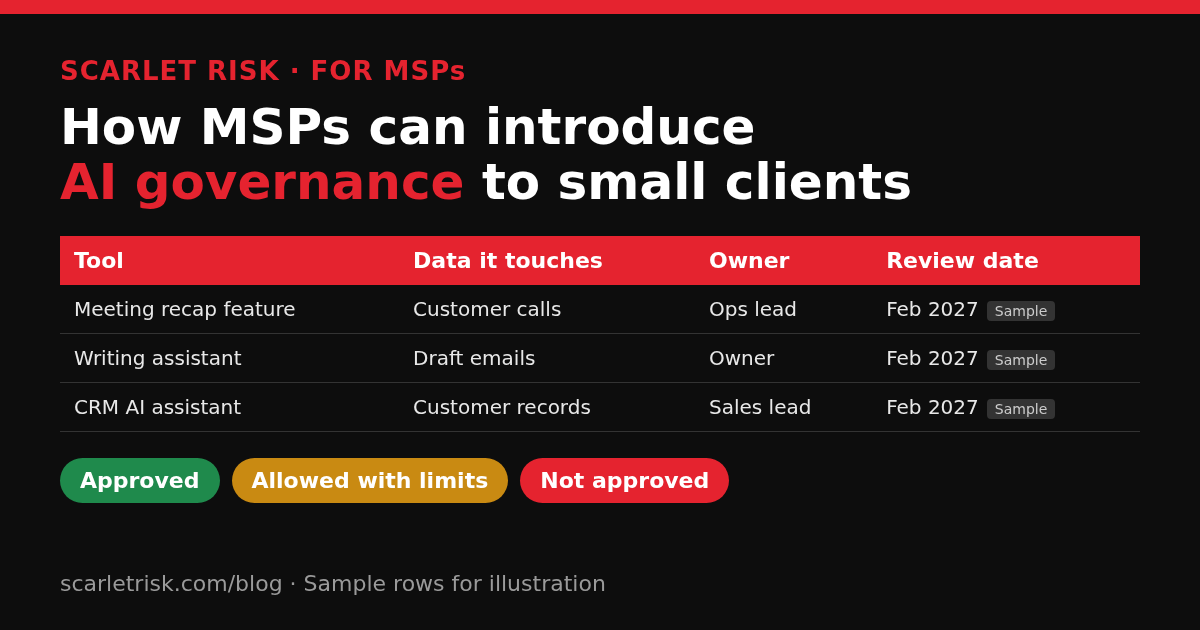
Build one list with four columns: tool, what data it touches, who owns it, and the next review date. Pull from three places:
- What you can already see. Enterprise apps and user consent grants in Microsoft 365 or Google Workspace, browser extensions your endpoint tools report, and anything your DNS or web filtering already logs. It won't be complete, but it's a real starting point.
- What people admit to. Ask directly and without blame: which AI tools do you use for work, including personal accounts? You'll hear about the summarizer Sales likes and the meeting recap someone switched on.
- AI features inside software they already pay for. CRM assistants, help desk draft replies, meeting recaps, writing tools inside the office suite. These rarely show up as a new vendor, which is exactly why they get missed.
We covered the workshop format in MSP angle: client AI tools that show up on the next questionnaire. For clients who want to run it themselves, see Shadow AI inventory for teams without a compliance hire.
Step 2: Make one decision per tool
A list with no decisions is just a scarier list. For each row, the client picks one of three:
- Approved: fine for work, including the data types listed.
- Allowed with limits: fine for some work, but never with customer data, employee records, credentials or financials.
- Not approved: stop using it, and here's the approved alternative.
The client makes the call and you advise. Write down who decided and the date. That one line turns "we think it's fine" into an answer they can give a customer.
For anything with standing access, like note-takers that join every meeting, inbox add-ins and apps with file permissions, add one more question: if this vendor had a bad week, how would we cut it off, and how fast? Revoking a connected app or OAuth grant from the admin console should be a known step, not a support ticket. Our one-page vendor risk questionnaire works for the bigger AI vendors on the list.
Step 3: Write the one-page rule
Most small clients don't need an AI policy binder. They need one page that people will read. It should answer five questions:
- Which AI tools are approved, and for what.
- What never goes into an AI tool: customer files, employee records, passwords and keys, unpublished financials, and anything under a contract that limits sharing.
- How to ask for a new tool, and who says yes.
- What to do if something sensitive was pasted by mistake (tell the owner the same day, no blame).
- A person reviews AI output before it goes to a customer, into a contract, or into a security answer.
In its September 2026 paper on shadow AI, the UK National Cyber Security Centre notes that people turn to unapproved services when official guidance lags behind how fast they start using these tools. A short, usable rule closes part of that gap. A long one that nobody reads doesn't.
Step 4: Give it an owner and a review date
Governance falls apart when it belongs to "everyone." Ask the client to name one internal owner. In a small company that's usually the owner, the ops lead or the office manager. Your job is to bring the list back on a schedule.
Quarterly works for most small clients. Add a trigger too: whenever a vendor announces a new AI feature or someone wants a new tool, it gets a row and a decision. Treat a newly enabled AI feature like a change to an existing supplier, not a harmless update. Five AI risks growing companies overlook explains why those quiet toggles matter.
NIST's AI Risk Management Framework, and its Generative AI Profile, frame this the same way at a larger scale: know which AI systems you use, and manage the security, privacy and intellectual property risks they bring. Your quarterly list is the small-business version of that.
Step 5: Connect it to the questionnaire the client will get anyway
This is where AI governance stops sounding abstract to a client. Their own customers are adding AI questions to security questionnaires: which AI tools touch our data, is our data used for training, and do you have an acceptable-use rule for AI?
If the client has the list, the decisions and the one-page rule, those questions have honest answers. If they don't, the answer is "Not yet, here's our plan and date." That's still better than a confident yes nobody can explain on the follow-up call.
You can reuse one answer library across clients, labeled by who owns what (client-owned tools versus tools your MSP runs). We covered that approach in How MSPs answer client security questionnaires without starting over.
What to avoid in the first conversation
- Leading with a monitoring product. Detection without decisions produces a list nobody owns. Add tooling later, once the client has decided what "approved" means.
- Promising coverage you can't see. Be clear about what your stack can and can't observe.
- Writing a 20-page policy. If people won't read it, it won't change what they do.
- Making it the client's IT problem. AI use is a business decision about data, so the owner has to sign off.
- Forgetting your own stack. Inventory the AI features in your RMM, PSA, help desk and documentation tools that touch client environments, and label them MSP-owned.
A simple way to package it
You don't need a new service line to start. Most MSPs can fold this into a review they already run:
- First meeting: inventory, decisions, one-page rule, named owner.
- Each quarter: review the list, add new tools and vendor features, update the decisions.
- When a questionnaire arrives: pull answers from the list instead of starting over.
If you already run seasonal checklists with clients, like our five Cyber Awareness actions for MSPs, the AI list fits in the same slot.
Want a shared starting point before the first client conversation? Run a free Risk Snapshot and use the one-page gap report as the agenda.
Where Scarlet fits
I'm building Scarlet Intelligence for small teams without a compliance hire, and for the MSPs who support them. You can run a free Risk Snapshot for a client, share the one-page gap report, and scope the fixes as projects (more for MSPs here). Shadow AI Lite, included in the free 14-day Scarlet Pro trial (no card needed), gives you a self-reported AI tool inventory: people list the AI tools they use, and you track a decision for each one. It only records what people report. It doesn't scan devices or networks or find tools automatically, so the client conversation above still matters.
Start here: Get a free Risk Snapshot. It stays free and shows the biggest cyber, vendor, AI and compliance gaps, plus what to fix first. If you'd rather talk through how this fits your client reviews, grab 30 minutes with me.
Pete Macias, Founder, Scarlet Risk
Sources
- UK National Cyber Security Centre, "The hidden risks of shadow AI," 7 September 2026: ncsc.gov.uk PDF
- NIST, AI Risk Management Framework (includes the 26 July 2024 Generative AI Profile, NIST AI 600-1): nist.gov/itl/ai-risk-management-framework
Find out which AI tools are creating risk in your business. Get your free Risk Snapshot.
Get your free Risk Snapshot